Check out the 2026 QSR Operational Index here!
Search PAR

PAR Alumni Information

Welcome to the PAR Alumni landing page, where you can access key information about benefits, ADP login details, and other useful resources for your post PAR transition

Helpful Information

USA Icon

PAR Equity/Stock

On the Separation Date, all unvested equity awards granted to you by PAR Technology Corporation shall be automatically cancelled without payment of any consideration by the Company. If you were awarded stock options, you will have three (3) months following the Separation Date to exercise any stock options that are vested as of the Separation Date, otherwise the vested stock options will automatically expire without value.

To avoid forfeiture of any vested stock options, contact Equityadministration@partech.com to process any required paperwork.

Log into Shareworks ( https://par.solium.com ) to view your current balances. You will have access to Shareworks after your Separation Date, please ensure you add a personal email address to your account to receive any communications from them regarding year-end tax statements.

ADP Access

To access previous pay and tax statements, update your address and other demographic information, please login to ADP (https://workforcenow.adp.com/).

To view and update your address, name or other personal information, navigate to Myself>My Information>Profile>Personal Info>View More to update the info and save.

To view and download your W-2 or T4 or pay statements in ADP, select Myself>Pay>Pay & Tax Statements.

Have further questions? Reach out to the PAR Payroll Team (par_payroll@partech.com)

Employment Verification

PAR has selected The Work Number® service from Equifax to help provide automated income and employment verifications for our US based employees.
The Work Number can provide how much money you make or proof of where you work 24 hours a day, 7 days a week. If someone such as a mortgage lender, property leasing company, a financial institution, or government agency is looking to receive this information, direct them to one or all of the following below:

www.theworknumber.com
800-367-5690 M-F 8:00AM to 8:00PM (ET)
member@Equifax.com
Employer Code: 613230

Benefits

This site contains information from the PAR medical, dental, vision and FSA plans

Medical Plans

Contact by Phone
1 (877) 253-4797

PAR offers employees the choice between two high deductible (HDHP) medical plans and a PPO option through Excellus BCBS. Highlighting the in-network benefits for these options:

2026

  • Premier HDHP
  • In-Network Deductible $1,800 employee only/$3,600 employee + tiers
  • In-Network Out-Of-Pocket Maximum $4,000 employee only/ $8,000 employee + tiers
  • Rx copays $10/$40/$75/$100

Basic HDHP

  • Deductible – $4,000(individual)/$8,000(family)
  • Out of Pocket Max – $5,500(individual)/$11,000(family)
    (each person has an individual maximum)

PPO

  • Deductible – $750 (individual)/$2,250 (family) for services subject to the deductible
  • In-Network Out-Of-Pocket Maximum $3,000 employee only/$7,000 employee + tiers
  • Rx copays $15/$35/$50/$100
  • Primary Care – $25 Copayment
  • Specialist Care – $40 Copayment

With Excellus BCBS you can:

  • Find in-network doctors, care, & cost estimates
  • Connect with virtual care (telehealth) providers 24/7
  • Print or view your medical ID card
  • Manage prescriptions or find a pharmacy

Customer Service | 1-800-464-4000

For the 2026 plan year, all eligible employees located in California will be able to choose to enroll.

2026 Plan

The Kaiser HMO plan offers:

  • Deductible $750 (individual)/ $1,500 (family)
  • Out-Of-Pocket Maximum $3,000 (individual)/ $6,000 (family)
  • Medical Copays $30/$40 Primary/Specialist
  • Rx copays $15/$35/$70/20% up to $250

See the plan documents for more detailed information on the plan.

Customer Service
1-800-464-4000

Benefits Brochures

Customer Service | 1-800-464-4000

New for the 2026 plan year- All eligible employees located in Colorado will be able to choose Kaiser as an alternative medical plan option.

2026 Plan

The Kaiser HMO plan offers:

  • Deductible $500 (individual)/ $1,000 (family)
  • Out-Of-Pocket Maximum $2,500 (individual)/ $5,000 (family)
  • Medical Copays $20/$30 Primary/Specialist
  • Rx copays $10/$30/$60/20% up to $250

See the plan documents for more detailed information on the plan.

Customer Service
1-800-464-4000

Benefits Brochures

Dental Plan

Dental Coverage

Poor oral health can lead to a number of other health issues. To keep your smile in its best shape, we encourage you to explore the options available via our dental plan through MetLife.

You have the option to enroll in one of two dental plans:

  • High Plan – annual maximum $3,000 & ortho lifetime max $3,000
  • Low Plan – annual maximum $1,500 & ortho lifetime max $1,000

Both plans have a deductible for Type B & C (non-preventive) coverage of $50 (individual)/$150 (family).

Check out the plan summary document to determine the plan that’s best for you and your family!

The company name for members to register on MetLife’s website is PAR Technology Corporation. Policy number is 174623.

Note – employees do not receive ID cards from MetLife and can either use their SSN with their provider or print an ID card within their online account.

Benefits Brochures

Vision Plan

Doctor Network
VSP network eye doctors are independently certified, making it easy to choose the optometrist or ophthalmologist who’s right for you. With your yearly comprehensive eye exam, your VSP network doctor can detect signs of health conditions like hypertension and diabetes.

To keep your vision in top shape, we encourage you to explore the options available via our vision care plans through VSP.

Our coverage includes:

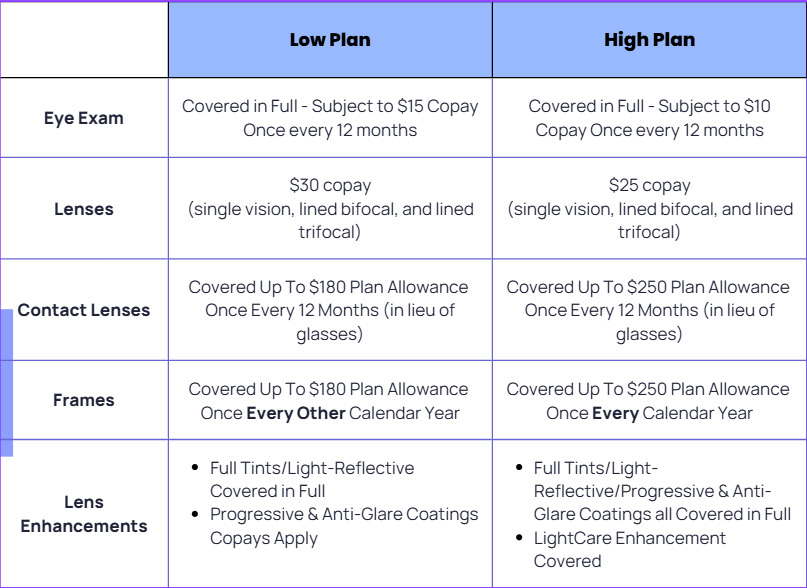
  • An annual eye exam with a copay
  • Necessary options such as frames, lenses, or contact lenses (up to a certain amount in-network and out-of-network).

You can enroll in one of the below Vision plans:

  • Premier (High) Plan – offers the additional benefit of progressive lenses, higher allowances & new frames every year
  • Base (Low) Plan – new frames every other calendar year

Note – employees do not receive ID cards from VSP and can either use their SSN with their provider or print an ID card within their online account.

Flexible Spending

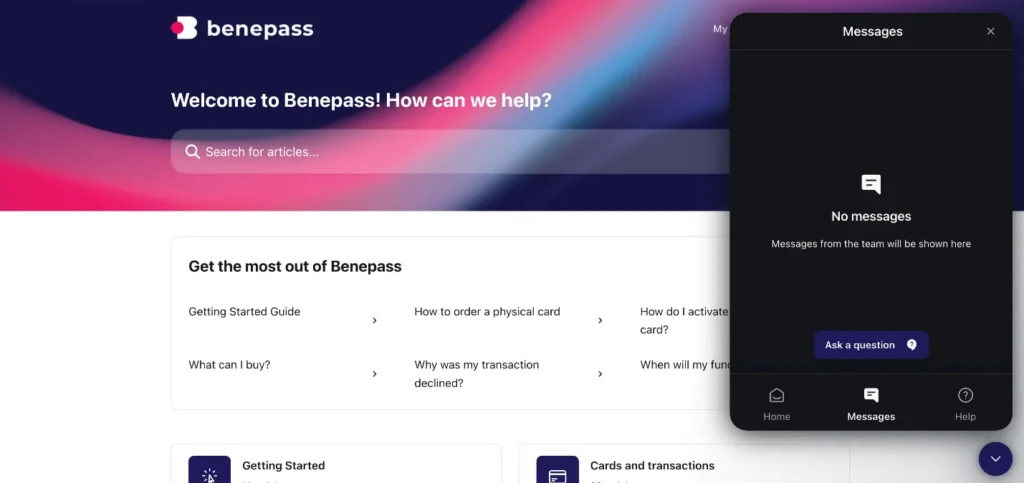
Flexible Spending Accounts with Benepass

Medical FSA: pays for qualified health care, vision & dental expenses

Limited Med FSA: pays for eligible dental & vision expenses

Dependent Care FSA: pays for eligible expenses for dependents under age 13, or another dependent that is physically/mentally incapable of self-care

If you cannot log into your Benepass account, you can contact the employee-dedicated support team directly by going to the Benepass Help Center, using the messenger in the lower right-hand corner, clicking on Messages, then on Ask a Question you can type in “submit a ticket.” From there, you can provide your details like your name and company name (PAR Technology Corporation) and the personal email you’d like to use going forward.

Individuals will have 90 days after their last day to use the FSA funds for any eligible expenses that occurred through their last day.

401(k) Information

Information regarding your distribution rights with respect to your vested benefits under the PAR Technology Corporation 401(k) Plan will be sent to you from the 401(k) Plan Administrator, Charles Schwab Corporation.

The Charles Schwab Participant Service Team is available by phone Monday through Friday from 8am to 10pm ET at 800-724-7526 or you can go online (https://workplace.schwab.com/) for more information about your account.

COBRA Vendor Information

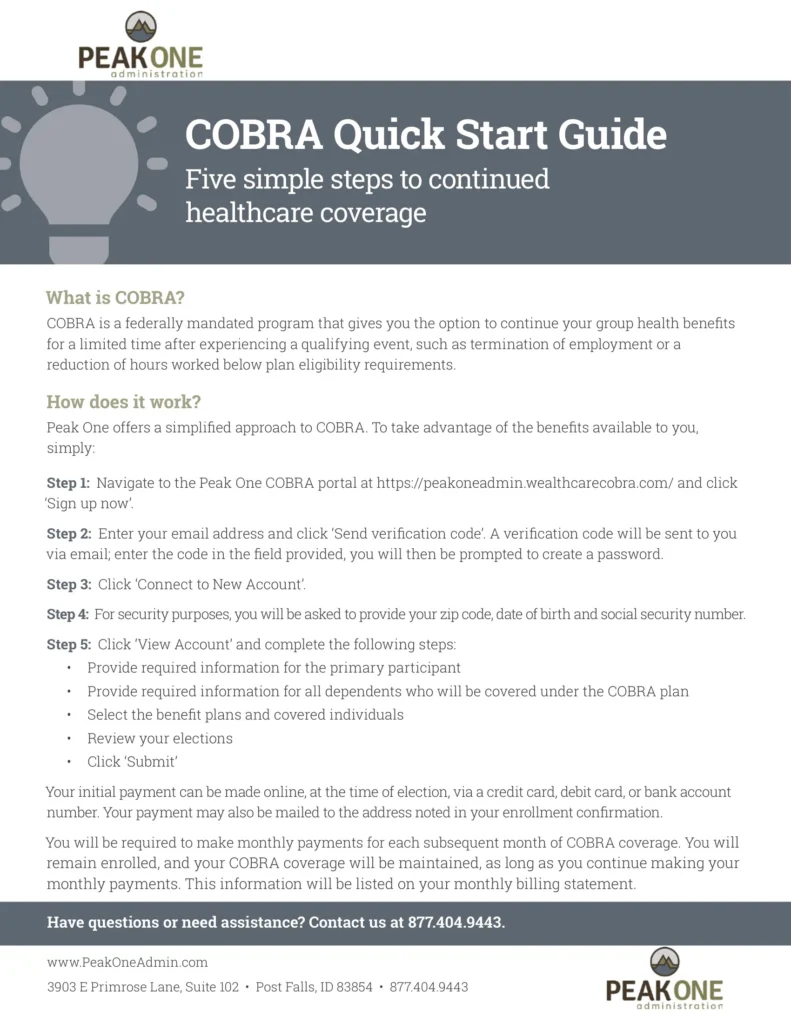
Peak One Administration website https://peakoneadmin.com/participant/
Email: benefits@peakoneadmin.com
Phone: 877.404.9443
Fax: 855.495.3669
Office Hours: 7:00 am – 4:00 pm PT, M – Th and 7:00 am – 3:00 pm PT Friday

60-Day Election Period: You have up to 60 days to decide whether to continue coverage after you receive your COBRA notice. You must make your first premium payment within 45 days after electing coverage.

Helpful Information

C

PAR Equity/Stock

On the Separation Date, all unvested equity awards granted to you by PAR Technology Corporation shall be automatically cancelled without payment of any consideration by the Company. If you were awarded stock options, you will have three (3) months following the Separation Date to exercise any stock options that are vested as of the Separation Date, otherwise the vested stock options will automatically expire without value.

Equityadministration@partech.com to process any required paperwork.

Log into Shareworks ( https://par.solium.com ) to view your current balances. You will have access to Shareworks after your Separation Date, please ensure you add a personal email address to your account to receive any communications from them regarding year-end tax statements.

ADP Access

To access previous pay and tax statements, update your address and other demographic information, please login to ADP (https://workforcenow.adp.com/).

To view and update your address, name or other personal information, navigate to Myself>My Information>Profile>Personal Info>View More to update the info and save.

To view and download your W-2 or T4 or pay statements in ADP, select Myself>Pay>Pay & Tax Statements.

Have further questions? Reach out to the PAR Payroll Team (par_payroll@partech.com)

Record of Employment (ROE)

A Record of Employment (ROE) is a document issued via Service Canada when you stop working or experience an interruption of earnings. Service Canada uses your ROE to determine eligibility for Employment Insurance (EI) benefits.

How you’ll receive your ROE

Your ROE will be issued electronically and submitted directly to Service Canada.

How to access your ROE

You can view your ROE online through Service Canada’s My Service Canada Account (MSCA).

Benefits

This site contains information from the PAR medical, dental, vision and FSA plans

Health and Dental Insurance

Manulife

Canadians have trusted Manulife for over 130 years. Manulife offers a range of plans that can be customized to suit your lifestyle and budget. These plans include a variety of options for comprehensive and affordable coverage that focuses on what’s most important to you and helps protect you from health care expenses not covered by your government health insurance.

Manulife FollowMe is an individual health & dental plan designed for people leaving employer coverage

What it covers:

  • Prescription drugs
  • Health & dental
  • Vision
  • Paramedical & mental health services
  • Optional travel insurance

You can apply for Manulife’s “FollowMe Health” plan, for you and your family (if applicable), without having to provide evidence of good health or undergo a medical exam, provided you apply within 60 days of the date your PAR Canada benefits end.

For assistance with applying for the individual Life Insurance policy AND/OR the FollowMe Health/Dental Insurance plan please contact our Financial Security Advisor:

Todd Hounsome (Manager Partner, Group, Life & Investments):

Brokers Trust Financial
2780 Highway 7, Suite 201, Concord, ON, L4K 3R9

Contact by e-mail: todd.hounsome@brokerstrust.ca or phone: 905-695-5161

Group Life Insurance and/or Optional Life Insurance

Sun Life
You can convert your life insurance to an individual policy, without having to provide evidence of good health or undergo a medical exam, provided you apply within 31 days of the date your PAR Canada benefits end. See attached Sun Life Group Benefits Life Conversion Option Application Form to enroll.

Retirement (RRSP)

Upon separation, your participation in the PAR Canada ULC Group RRSP will cease.

Your member account will automatically be transferred to Manulife’s Personal Plan (i.e. individual account).

Members can keep their assets in their Personal Plan account through any other employment; the assets will remain invested in the Manulife Personal Plan account and functions similar to our Group RRSP. You can login at Manulife RRSP.